a ui for claude code
A UI for Claude Code has one job: show what the agent is doing while it does it. Which session is working, which is parked on an approval, what it just ran, and what it cost. A chat window shows none of that. crystl shows all four, for every session at once.
crystl is a macOS terminal built for agents. Every session inside it is the real Claude Code CLI, with the things a terminal cannot give you on its own layered over the top: live approval cards, an activity list across projects, per-session token tracking, and searchable history.
Free version available · upgrade for advanced features · macOS
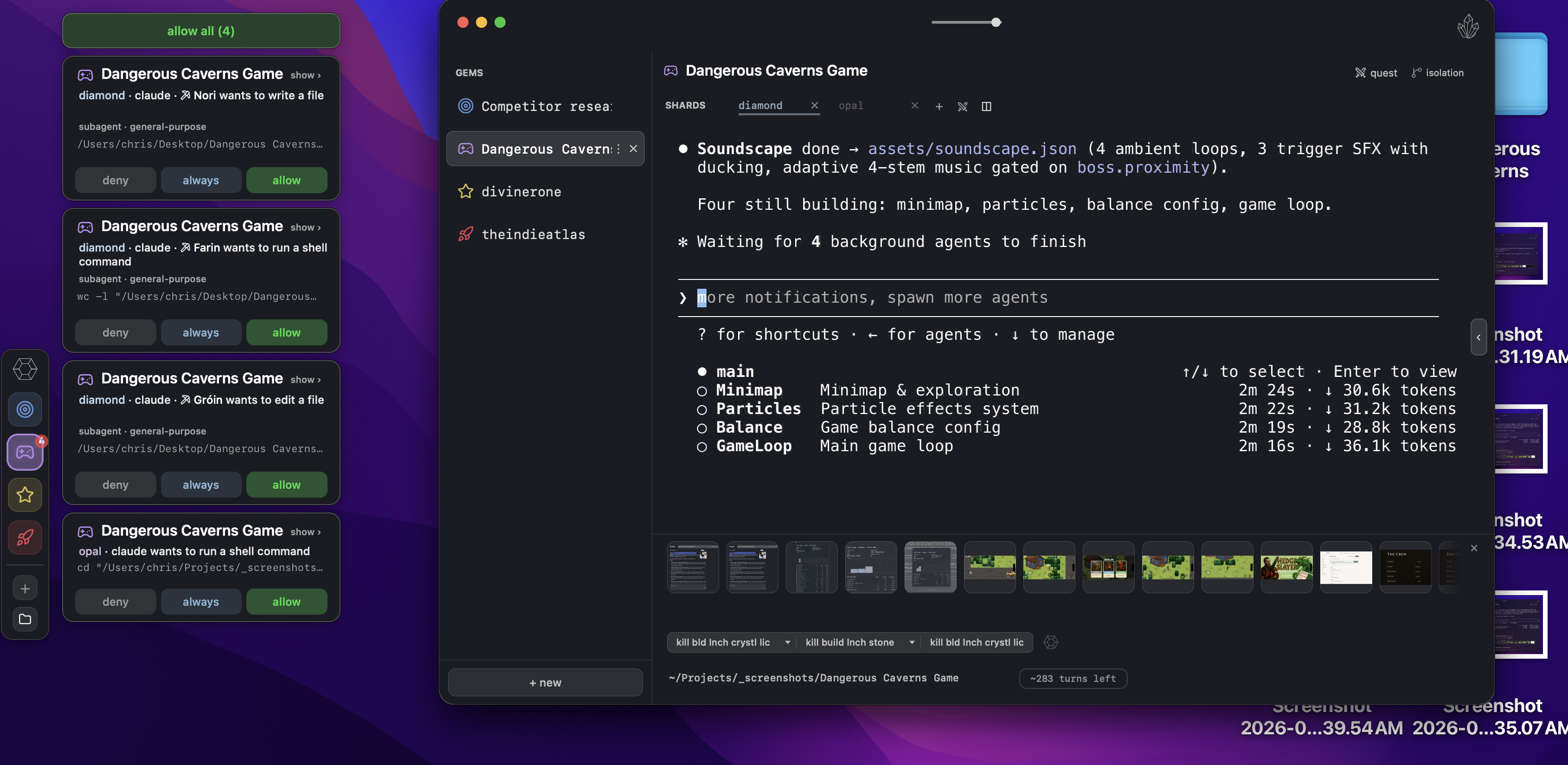
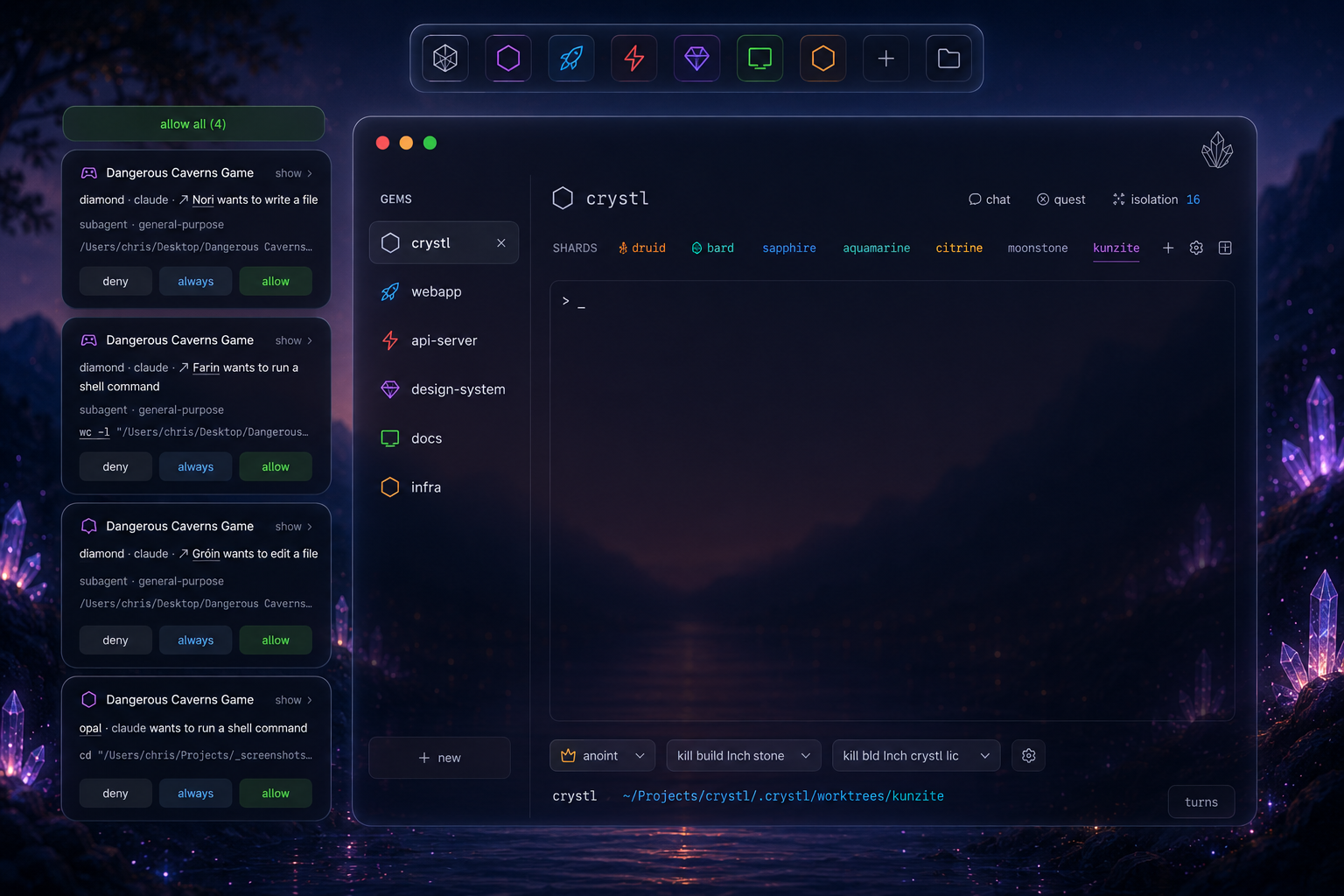
Approvals, questions, and notifications from every session, surfaced as panels you can act on without switching projects.
a chat window is not a ui for supervising work
Most interfaces built for language models are conversation interfaces. You type, it answers, you read the answer. That shape works when the model produces text and stops.
Claude Code does not stop. It reads files, edits them, runs tests, asks for permission to run something destructive, waits, and keeps going. Run three of those at once and the interesting state is no longer in the conversation, it is in the gaps between the conversations: the session that finished eight minutes ago and is sitting idle, the one blocked on a permission prompt you never saw, the one quietly burning through its context window on a file it should not have read.
Terminal tabs do not surface that either. A tab shows a title, not a state. The only way to find out which agent needs you is to click through every tab and read, which is the exact work you started running agents to avoid. Everything below is what a UI has to answer instead.
six things a claude code ui has to show you
Who is working
With one agent, the terminal is the status display. With five, you need a list: every session, what it is doing, and whether it is still moving. crystl keeps that in one panel you open from the rail, either across all projects or scoped to one.
agent activity panel →Who is stuck
A parked agent looks exactly like a finished one: quiet. That is the single most expensive thing a terminal fails to tell you. Claude Code fires a hook when it needs permission, and crystl turns that hook into a card with allow and deny buttons, glowing in the color of the session that asked.
floating cards →What it just did
Agents fold their own tool output down to a single grey line. The output is not gone, it is just somewhere a terminal cannot reach. Click a folded row in crystl and the whole thing opens beside your session, with a copy button.
tool calls →What it cost
Claude models run in a fixed context window. crystl records the token usage of every turn and, once a session has three turns of real data, shows an estimate of how many turns it has left before the window runs out.
token tracking →Where the work landed
Two agents editing one repo is a merge conflict waiting to happen. An isolated session in crystl gets its own git worktree and branch, dependencies installed, and a badge on its tab counting commits ahead of the base branch.
isolated sessions →How to get back to it
Sessions outlive your attention. Every command and every agent message stays searchable across projects, open or closed, so a session you shut yesterday is still reachable today.
history navigator →where each answer lives
Same questions, asked of a plain terminal and of crystl. The difference is not what is possible, it is how much of your attention the answer costs.
| What you need to know | In a terminal | In crystl |
|---|---|---|
| Which session is working right now | Click into each tab and read the last few lines | A live status dot per project, plus one panel listing every agent across every project |
| Which session is blocked on an approval | Nothing tells you. You find it when you go looking | The request floats as a card with allow and deny, colored to the session that asked |
| What the agent just did | A folded grey line reading "+38 lines (click to expand)", which the terminal cannot expand | Click the folded row and the full tool input and output opens beside the session |
| What the session has cost so far | Not tracked. You notice when it compacts | Per-turn token counts and an estimate of how many turns are left in the context window |
| Which agent asked you a question | A prompt buried in whichever pane scrolled past | A question card labeled with the project and session name, answered in place |
| What an agent said three hours ago | Scrollback, if it is still in the buffer | Search across every session, open or closed, in every project |
what it looks like
it is still the real cli
None of this reimplements Claude Code. Each session in crystl runs the CLI you already have, with yourCLAUDE.md, your MCP servers, yourskills and plugins, plan mode, slash commands, andapproval modes exactly as they behave in any terminal. The UI is additive. When you want to run git, tail a log, or ssh somewhere, it is a normal terminal too.
The same holds for other agents. Codex sessions get approval cards and notifications through hooks the same way. Anything else you can run at a shell prompt runs in a session and gets the rest.
see every agent at once
Create a free account and download crystl for macOS.
get started freegetting started guide →Frequently asked questions
- What is the best UI for Claude Code?
- It depends on what you need to see. If you run one session at a time, Claude Code's own terminal interface is enough. Once several sessions run at once, you need something that shows which one is working, which is waiting on approval, what each just ran, and what each has cost. crystl is a macOS app built around exactly those four questions, and every session inside it is a real Claude Code session.
- Does Claude Code have a web UI?
- Yes. Anthropic runs Claude Code on the web at claude.ai/code, alongside the CLI, a desktop app, and IDE extensions for VS Code and JetBrains. Community projects also wrap the CLI in a browser interface. crystl takes a different route: a native macOS app where each session is still the terminal CLI, with the supervision surfaces layered on top.
- How do I see which Claude Code agent is waiting for my approval?
- Claude Code fires a hook when it wants permission to run a tool. crystl listens for it and floats an approval card showing the tool name, the working directory, and allow and deny buttons, tinted to the session that asked. When several requests queue up, an allow-all bar appears. Nothing needs to be in focus for the panel to reach you.
- Can a UI show how many tokens Claude Code has used?
- crystl records input and output tokens for every turn from the Stop hook, per session. After three turns it can compute a burn rate, and the status bar shows an estimate of how many turns fit in the remaining context window. The project optimizer also shows what each installed plugin and skill costs you before a session even starts.
- Is there a UI for running several Claude Code sessions at once?
- Yes. In crystl a project is a gem and each session inside it is a shard, so you can open as many Claude Code sessions in a project as you want. Isolated shards each get their own git worktree and branch, which is what lets several agents work the same repository at the same time without overwriting each other.
- Does a UI for Claude Code work with other agents?
- In crystl, yes. Every shard is a full terminal session, so any CLI agent runs in it. The panel features depend on what each agent exposes: Claude Code has the deepest integration, Codex supports hooks so approvals and notifications work there too, and Antigravity CLI does not support hooks yet, so those panels are unavailable for its sessions.