Agent Activity Panel
Updated October 15, 2026
The agent activity panel does three things: it shows what your agents are doing, it shows who works for whom, and it shows the files they touched. All three are in one window, split across three tabs, so you can check on a whole workspace without switching between gems and shards one at a time.
It’s a real window, too, not a card in the floating stack. Drag it where you like, resize it, leave it open on a second screen. It remembers its frame, so it reopens where you left it.
Opening the panel
There are two ways in, depending on the scope you want:
- All gems: click the diamond icon at the top (or left end, in top mode) of the crystal rail. This opens the panel across every open gem.
- One gem: click a gem’s tile in the rail once to bring it into focus, then click it again for a compact popover listing just that gem’s shards and their status. The full panel, touches included, is the diamond.
The panel opens on agents │ orchestration │ touches. The agents tab is the live view, the orchestration tab is the map of who works for whom, and the touches tab is the record of what got written where.
While the panel is the focused window, Tab cycles through the three tabs and wraps around; Shift + Tab goes back. A small hint at the right of the tab strip, ⇥ / ⇧⇥ switch tabs, names both keys.
agents
Every shard is one row with its own labelled columns: name, gem, agent and model, context, state. The tab gathers each agent’s activity and token usage in one place, so you can see at a glance which agents are working, which are idle, and where your tokens are going across the whole workspace.
Work not yet merged
The unmerged column shows which shards hold work that has not reached the gem’s integration branch. Because the panel lists every gem, it answers “is anything unfinished anywhere” in one window, the same question crystl shards --all answers in the terminal.
A branch left behind when its shard closed gets a row too, in its gem’s section. That row is named for the branch and its state reads parked. It has no shard to open, so it offers no nudge. If crystl could not read a gem’s branches, the column says unknown for that gem. An empty cell would wrongly mean “nothing parked here”.
Who needs a person
The top of the tab is a “needs a person” zone that spans every gem you have open: shards parked on a dialog, sitting on an unanswered question, or out of credentials. The newest problem lands last, and the header calls out the oldest wait. Your per-gem sections sit underneath it, unchanged. When nothing is waiting it says so.
An agent card with an action button appears here too. A card asking you to do something is a request, so it sits with the shards waiting on you, and its button works from the row. Pressing it anywhere — here, the floating card, or your phone — runs the action and retires the card everywhere at once. Cards without a button stay in notifications.
Shards out of quota
A shard waiting out a usage limit is not something a person can fix, so it no longer takes a row. Those collapse into one line at the foot of the zone — 3 stalled until their limits reset · soonest 2h — which opens on a click when you want to see which ones. It stays closed until you open it, and remembers what you chose. Each shard still has its ordinary row in its gem section, and crystl shards --all still lists them in full.
The moment a limit resets, that changes. The shard is free to run and nothing restarts it on its own, so it moves up into the zone reading limit reset — nudge to resume, with a nudge button on the row. One exception: if its turn ended by asking you something, the question still needs an answer, so the row keeps saying it needs you and offers no nudge.
Idle rows say what actually happened
An agent that asked you a question used to look exactly like one that finished its work. Now an idle row shows its last turn: a shard that ended on a question says it needs you and quotes the question, a turn that failed says that instead, and a clean finish reads as done. The wording is the same vocabulary crystl shards prints, so the panel and the terminal can never disagree about a shard.
For a deeper look at how crystl accounts for tokens per turn, including what each plugin and skill costs, see context load tracking.
orchestration
The orchestration tab draws your fleet as a lineage tree: who spawned whom, and who is accountable for what. Where the agents tab answers “what is each shard doing,” this one answers “who works for whom.”
- Deus over rulers over workers. A Deus sits above the orchestrators it coordinates, and each orchestrator sits above the workers it spawned. Every worker is nested under its lead.
- A court reads as one orchestrator. The crown and the hand are bracketed together, since they’re two seats of one lead. See court.
- Fan-outs are grouped by reach. A fan-out whose subtree really spans more than one gem is grouped apart from one that stays home, so a multi-gem fan-out is obvious at a glance. That matters because a worker in a different gem from its lead is the one crystl’s vigil stall watch cannot see for you.
- Orphans get their own group. A shard whose lead was closed lands under an ORPHANS heading. That is work nothing is accounting for, and it used to be invisible.
crystl shards --all groups and ranks the same way, so the panel and the CLI tell one story.
touches
An isolated shard promises that your agent’s work is a branch you can read, merge, or throw away. Two kinds of activity fall outside that promise and leave nothing behind: a write that lands outside the worktree (a home dotfile, another project’s directory, a global install) has no diff and no undo, and a credential read is invisible after the fact even though agents are routinely instructed to go and read .env.local for service keys.
Neither is a thing to stop. Both are things you want to be able to look at after an unattended fan-out has been running while you slept. So crystl records them, and the touches tab is where you read them back.
What gets recorded, and what you see by default
Every file an agent writes through a tool call that names it is recorded, and so is every read of a credential path. Reading anything else produces no entry: this is not a history of every file your agent opened. (“Names it” is an important qualifier in that sentence — see what it cannot see.)
Each recorded path is then classified, and the tab shows you the classes worth looking at. Labels are terse on purpose — the row is one narrow line with the gem, the shard, the action, a count, the tool and an age, so each class says verb + target and nothing else:
| Shown by default | What it is |
|---|---|
| wrote credential | A write to a credential path — .env*, ~/.ssh, ~/.aws, ~/.npmrc, *.pem, and the like — wherever it is, including inside the shard’s own repo. |
| read credential | A read of one of those paths, again wherever it is. |
| wrote main checkout | An isolated shard writing into its own gem’s mainline checkout — outside its worktree, and in no branch at all. It will not merge when the worktree merges and will not vanish when it is discarded. |
| wrote other worktree | An isolated shard writing into a different worktree of the same gem, so the change lands in another agent’s branch. |
| wrote other gem | A write under a different open gem’s root. |
| wrote shared config | A write through one of the config symlinks crystl manages (CLAUDE.md, AGENTS.md, .mcp.json, .claude/) into the gem that owns it. |
| wrote outside project | A write anywhere else: home dotfiles, system paths, global installs. |
Two more classes are recorded but sit behind the panel’s show all toggle:
| Behind show all | What it is |
|---|---|
| wrote in bounds | A write under the shard’s own root. Fully reversible — it’s in the diff, or you discard the branch — so it doesn’t need your attention. |
| wrote scratch/cache | A write into a scratch or cache location, matched after symlinks are resolved, so /tmp still counts as scratch despite being a symlink to /private/tmp on macOS. |
That split is the whole point. A badge that counts ordinary in-repo edits is a badge nobody believes, so routine work is kept out of the default view rather than out of the record.
A credential write outranks location, deliberately. A write to a .env sitting inside the project is classified as a credential write, not as ordinary in-bounds work, so it surfaces. Reading .env.local is the documented normal workflow and shows up as exactly that; writing ~/.ssh/authorized_keys, ~/.aws/credentials, ~/.npmrc, or a project .env is key injection or a silent credential rotation. Without that precedence an in-repo .env write would be filed as routine and never seen, which would make the record blindest exactly where it matters most.
Reading a row
One row per path, aggregated: repeated edits to the same file raise a count instead of flooding the list.
path · gem · shard · what it did · count · tool · age
“What it did” is the plain-words class from the tables above, so a row reads as a sentence rather than as a category you have to decode. Two actions are at the end: reveal opens the file in Finder, and seen marks the row reviewed.
Colour ranks the surfaced classes against each other:
- Red — wrote credential. The top of the scale, wherever the file is.
- Amber — read credential, wrote main checkout, wrote other worktree, or wrote other gem. The rows you most often actually need to look at.
- Plain — wrote shared config, or wrote outside project. Surfaced, but not shouting.
The path is shown both as the tool reported it and as it actually resolved, when those differ. That is what makes a symlink escape legible: worktree/link → ~/.zshrc reads as the escape it is, while still counting as one row per real destination.
The badge and the card
A flag badge (⚑N) below the shard’s tab counts that shard’s unreviewed surfaced entries. It’s tinted to the shard’s own color and sits under the tab beside the ↑N merge badge, following the same grammar, so a shard that did something worth a look says so without the panel open. Click the flag to open this panel on the touches tab and read exactly what it counted.
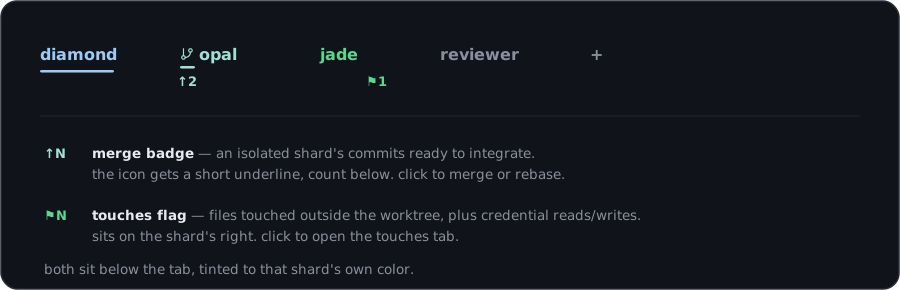
Reviewed is an explicit action. Opening or scrolling the panel does not clear the badge, because clearing it on a glance would silently discard the exact count you meant to act on. Click seen on a row and it clears; if that same path is touched again afterwards the row goes back to unreviewed, since the count and the last-seen time both changed.
You get one notification card per shard per app run, on that shard’s first surfaced entry, with a review button. After that the shard stays silent. A card per event would be noise you switch off within a day.
Remote shards say so
crystl classifies paths on local shards. A remote shard over SSH reports remote path coverage unavailable rather than a count of zero. A zero would read as “this worker touched nothing,” which is the one wrong answer this tab must never give. Reveal-in-Finder is local-only for the same reason.
Three things to know
It is in memory, and it clears when crystl restarts. There is no file on disk keeping this. The record is there to answer “what did the fan-out do while I was asleep,” and the app stays running across that; quit crystl and it starts empty. Closing a shard or a gem does not clear it, though. Finishing with a worker is a normal end-of-quest action and it must not erase what that worker did, so entries from closed shards stay readable.
It is a record, not a gate. Nothing here blocks, prompts, or changes what gets approved. The auto-approval modes keep exactly the meaning they had before, and all still means all. This is on purpose rather than a limitation: an approval prompt raised at 2am under all is not a gate, because nobody is there to answer it. It just parks the worker until morning and turns an unattended run into a stalled one. Recording is the only intervention that still means something when nobody is watching.
Only the count leaves the machine. The bridge carries a shard’s unreviewed count and its coverage state to the phone and to crystl shards. The paths never go anywhere. That is a deliberate line, not an oversight: a list of the paths your agents read is an index of where your credentials are kept on this machine. It is excluded from crystl report and from --diagnostics, which stays a numbers-only health snapshot. Paths are all that is ever recorded, too, never file contents or tool output.
What it cannot see
So you read the tab for what it is:
- Arbitrary shell writes are invisible.
cp,>,sed -i,npm install -g, and installer scripts write to unbounded destinations, and a heuristic there would look like coverage while missing most of it. Structured writes are covered: your agent’s ordinary write and edit tools, and Codex’sapply_patch(every file in a patch, checked separately). - Credential reads in shell commands are caught, via a conservative scan for the short list of credential paths, so
cat ~/.ssh/…andsource .envdo register. Variable indirection and generated paths do not. - Only agents running in crystl shards are recorded. This is not machine-wide.
- Remote paths are not classified yet, and the tab says so instead of guessing.
Related
- isolated sessions: the hook-based guard for supported structured writes, plus the narrower Bash self-destruction guard
- approval modes: the three modes, unchanged by any of the above
- context load tracking: per-turn token accounting behind the agents tab
- orchestration guide: how to run multiple agents, the roles the orchestration tab draws
- vigil: the stall watch over fan-outs